Esport Icons for Modern Digital and Print Projects
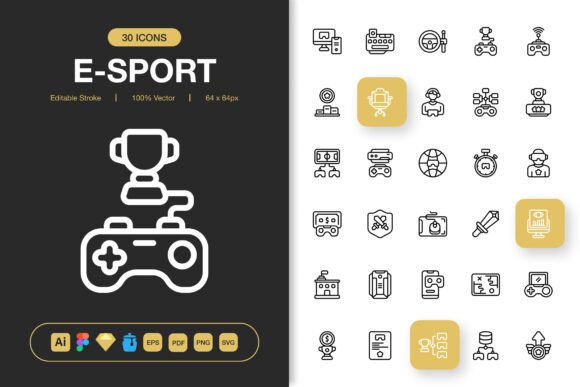
Every designer, developer, or content creator eventually faces the same challenge—finding graphic assets that look sharp, scale perfectly, and don't take hours to customize. The Esport Icons set addresses this directly. It consists of a high-quality collection of vector-based icons built around competitive gaming culture, streaming visuals, tournament branding, and digital entertainment themes. But the real strength lies in how broadly these icons can be used. They aren't limited to gaming alone. With a clean, minimalist design approach, they fit into websites, mobile apps, books, social media campaigns, infographics, flyers, print layouts, banners, posters, and plenty of other commercial or personal projects.
When you strip away decorative excess, you're left with symbols that communicate quickly. That's what makes this particular icon family useful across such different formats. A trophy icon, for instance, works just as well in a corporate annual report celebrating team achievements as it does in an esports tournament bracket. The same goes for headset, controller, mouse, keyboard, shield, lightning bolt, and crosshair symbols—they carry universal meaning that transcends a single industry. The minimal treatment ensures they don't become dated, which matters if you're building brand assets meant to last.
What Defines a High-Quality Icon Set
Not all icons are created equal. The Esport Icons set stands out because of several deliberate engineering and design choices. First, the editable stroke attribute gives you direct control over line weight, corner style, and endpoint treatment. You can match your existing brand guidelines precisely instead of settling for whatever thickness the original designer chose. This alone saves enormous time during production, especially when you're working across multiple platform requirements where visual consistency is non-negotiable.
Another critical factor is the format coverage. You receive a source Adobe Illustrator file, a Figma file, an Iconjar file for organized browsing, a Sketch file, EPS Version 10, a PDF file, SVG files, and multiple PNG resolutions with transparency. The PNGs come in 32px, 48px, 64px, 96px, 128px, 256px, and 512px sizes—essentially covering every predictable need from favicon dimensions to large-format print exports. This means you aren't stuck upscaling a small raster image and dealing with blurry edges. You also avoid the headache of converting between incompatible formats late at night before a deadline.
Editable Stroke and True Customization
Editable stroke capability is more than a bullet point. In practice, it means you can open the source file and change stroke width from 1px to 4px or more without losing sharpness. You can convert strokes to outlines if your production pipeline demands it. You can adjust cap types and joins. For a UI designer working on a mobile app that uses thin, delicate iconography on one screen and bolder icons on another, this flexibility eliminates the need to source two different sets. You simply adapt what you already have.
Customization extends beyond strokes. Because the icons are vector-based, color changes happen instantly. You can apply gradient fills, drop shadows, or even animate individual icon elements in tools like After Effects or Lottie. The 100% customizable nature means your creative control is never limited by the original artwork. This matters for agencies juggling multiple client brands, for solopreneurs refining their visual identity over time, and for in-house teams maintaining design systems across products.
Where Minimalist Icon Design Delivers Maximum Impact
The current design landscape favors clarity over complexity. Users scroll faster, attention spans shorten, and visual noise increases daily. Minimalist icon design cuts through that noise. The Esport Icons follow this philosophy—no unnecessary flourishes, no gradients that break at small sizes, no intricate details that become mud when scaled down. This restraint actually expands their utility. A clean icon placed on a busy website hero section draws the eye without competing with headlines. The same icon used on a print flyer remains legible even at extreme enlargement.
Consider social media graphics. Platforms like Instagram, LinkedIn, Twitter, and TikTok reward visually crisp content. When you're crafting a post about a live stream announcement or a tournament recap, the accompanying icon should reinforce your message, not distract from it. Downloading a ready-to-use SVG or PNG from the set cuts your assembly time significantly. You're not redrawing a headset icon from scratch for the hundredth time—you're grabbing it, maybe adjusting the color to match your palette, and moving on to more strategic work.
Websites and Mobile Apps
For web and app interfaces, icon consistency directly affects perceived professionalism. If your navigation icons have different stroke weights or slightly mismatched proportions, users may not consciously notice, but they'll feel that something is off. Using the Esport Icons across your UI ensures every symbol shares the same optical grid, scale, and styling. This is especially important for dashboards, player profile pages, match history screens, and streaming overlays where multiple icons appear simultaneously.
Easy drag and drop functionality also speeds up prototyping. Import the Figma or Sketch file, grab the icons you need, and place them into your layout. No searching through disorganized folders or paying for additional single icons from disparate sources. The Iconjar file makes browsing the entire collection intuitive—you simply type a keyword and the relevant icon appears. For fast-moving product teams, this workflow efficiency translates into shipped features and fewer late-stage visual bugs.
Print, Books, and Educational Materials
While digital applications dominate conversation, print remains a substantial medium. Educational publishers creating textbooks on game design or esports management need clean diagrams and visual aids. The Esport Icons work beautifully within instructional layouts because they scale to print resolution without pixelation. The included PDF and EPS files slot directly into InDesign, Affinity Publisher, or QuarkXPress workflows. A book cover designer might use the shield or trophy icon as a subtle background element, while an interior layout artist could place keyboard and mouse icons alongside technical explanation boxes.
Flyers and posters promoting local tournaments, charity streams, or gaming meetups also benefit. Print shops often require vector files for crisp output, and having the EPS and AI formats ready eliminates back-and-forth about file quality. The PNG sizes cover standard digital-to-print scenarios too—you can use the 512px version for a social media graphic and the same icon exported as a vector for the corresponding printed banner, maintaining visual continuity.
Practical Benefits That Go Beyond Aesthetics
Icons are often treated as decorative afterthoughts. That's a missed opportunity. Thoughtfully deployed icons improve information hierarchy, reduce cognitive load, and guide users through an interface or document. With a comprehensive set like this, you're not rationing your icon usage because you only have three that match your style. You have enough variety to assign distinct icons to distinct actions, categories, or sections—which actually helps your audience scan and comprehend content faster.
From a branding perspective, consistent iconography strengthens visual identity. Whether you're a streamer maintaining your channel graphics, a tournament organizer building event branding, or a SaaS company integrating gaming elements into your product, using the same icon family across touchpoints creates a cohesive experience. This cohesion signals professionalism and attention to detail, two factors that influence trust and engagement.
Efficiency Gains Through Organized File Delivery
The way files are delivered matters almost as much as the icons themselves. The Esport Icons package includes a Readme.txt file that explains what's included and how to get started—small detail, but it removes friction for first-time users. Every file format serves a clear purpose. The AI, EPS, and PDF files are your print and advanced editing workhorses. Figma, Sketch, and Iconjar files streamline digital design. The organized PNG and SVG folders let you jump directly to the exact size or format you need without digging through layers.
For teams, this structured handoff reduces onboarding time. A new designer can open the shared Figma library, pull icons into a wireframe, and immediately match the established visual language. Project managers avoid scope creep because icon-related design tasks get resolved faster. Freelancers can deliver higher quality work in shorter timelines, which directly affects client satisfaction and repeat business.
Real-World Scenarios and Recommendations
Imagine you're launching a mobile app that connects amateur esports teams with local tournaments. Your UI needs icons for "join team," "view bracket," "claim prize," "settings," "profile," and "live stream." Building these from scratch would take a week or more. Purchasing individual icons from multiple sources often leads to mismatched styles. Using the Esport Icons set, you prototype in Figma within hours, fine-tune stroke colors to your brand palette, export your SVGs and PNGs, and have pixel-perfect assets ready for development.
Or consider a content marketer assembling an infographic on esports industry growth. They need visual anchors for data points—revenue, viewership, player demographics, game genres. The icon set provides symbols that clearly differentiate each section without requiring custom illustration. The marketer drops PNGs into Canva, Adobe Express, or even PowerPoint, resizes as needed, and publishes a shareable graphic that looks polished without a designer's intervention.
Print shop owners and graphic designers working on event materials also gain substantial value. A five-foot banner for a gaming convention requires high-resolution artwork. Using the EPS or AI source file, the designer scales a controller icon to cover 20% of the banner area, knowing it will stay crisp. The same icon, exported at 64px PNG, becomes part of the event's email signature graphics. Consistency across drastically different output sizes is exactly what vector-based icon sets excel at providing.
Choosing the Right Icons for Your Project
When evaluating any icon set, including these Esport Icons, start by reviewing the actual vector quality—not just the preview images. Open the AI or Figma file and inspect how anchor points are placed. Clean, minimal anchor placement usually means smoother scaling and easier customization. Check whether strokes are actual strokes or expanded shapes; both have their uses, but knowing which you're working with prevents surprises mid-project.
Next, think about your most frequent export scenarios. If you primarily design websites, SVG support and well-organized file structure matter most. If your work skews toward print, confirm that EPS Version 10 opens correctly in your software and that colors convert cleanly between RGB and CMYK. The included PDF file also serves as a quick reference for anyone who needs to approve icon selections without opening design software.
Finally, consider long-term maintenance. Design trends shift, but minimalist, well-crafted icons tend to age gracefully. A set built around specific cultural trends can become irrelevant quickly. Esports and gaming culture have proven staying power, and the universal symbols within this set—trophies, shields, lightning bolts, headsets—transcend any single trend cycle. That makes them a practical investment rather than a disposable asset.
Seamless Integration Into Any Workflow
The real test of any design resource is how easily it integrates into your existing process. The Esport Icons collection prioritizes easy drag and drop, so you can literally click on an icon in the source file, copy it, and paste it into your working document. No import plugins, no complex extraction tools. For Figma and Sketch users, this feels entirely natural, but even for those working in less specialized tools like Google Slides or Keynote, the transparent PNGs slot right in with no background removal required.
The transparent PNG backgrounds deserve emphasis. Nothing ruins a layout faster than a white box behind an icon that's supposed to sit on a colored background. Every PNG size—from 32px up to 512px—comes with true transparency, meaning you can place icons over gradient backgrounds, photographs, dark mode interfaces, or patterned prints without cleanup. This production readiness saves hours of tedious masking and exporting.
Organized folder structures also mean you find what you need quickly. When you're racing toward a deadline, you don't want to scroll through a single folder with 200 unlabeled SVG files. The Readme.txt file typically explains the naming convention, and the Iconjar file provides a searchable interface that feels like browsing a well-maintained library. These organizational touches demonstrate an understanding of how professionals actually work.
Hope you like it and find genuine utility in the Esport Icons. When you next sit down to design a website component, a mobile screen, a book chapter opener, a social graphic, or a printed banner, having a clean, adaptable icon family at your fingertips changes how quickly and confidently you execute your vision. Good design assets don't just save time—they raise the baseline quality of everything you create.